Best Fiberglass Cable Tray Manufacturers and Cable Management Solutions
Fiberglass cable trays are a popular choice for durable, corrosion-resistant cable routing in challenging environments. This guide highlights key manufacturers and practical cable management solutions that complement fiberglass trays, helping you organize wires efficiently while maintaining safety and accessibility. Below you’ll find five top products that align with a professional, clutter-free setup.
Summary of Selected Products
| Product | Brand | Type | Key Benefit |
|---|---|---|---|
| [Upgraded] 2 Pack Cable Management Under Desk Tray | Xpatee | Under-desk tray | No-drill installation, fits tabletops up to 3″, dual open slots |
| Cable Management Net – Under Desk Wire Management | Ultimate Setup | Flexible net tray | Dust-hiding, universal desk compatibility |
| 2 Pack No-Screw Cable Management Under Desk | Aserelix | Adhesive tray | No tools, clean look, easy maintenance |
| Mount-It! Under Desk Cable Management Tray | Mount-It! | Clamp-on tray | Clamp-on for no-drill installation, dual-facing |
| Univivi No Drill Under Desk Cable Management Tray | Univivi | Fabric tray | Large capacity, two installation options |
Xpatee [Upgraded] 2 Pack Under Desk Tray

The Xpatee under-desk tray is presented as an upgraded solution designed to accommodate desk thicknesses from 0.4 to 3 inches. It features 3″ extension clamps for thicker table tops and non-slip pads to protect surfaces, suitable for wood, glass, or metal desktops. The tray offers dual open slots for easy access to electrical outlets and a mesh design that aids dust control and heat dissipation, reducing heat-related safety concerns from tangled cables.
Installation is described as no-drill, with mounting flexibility to place the tray on the inside or outside edge of the desk. This makes it ideal for narrow desks or setups against a wall, where traditional fixed trays may not fit. The combination of open-slot access, dust-reducing mesh, and desk-edge placement provides a practical approach to cable management without permanent modification.
Key features include:
– Upgraded fixture design for 0.4–3″ desk thicknesses
– Dual open slots for easy installation and quick access
– No-drill installation with flexible placement
– Non-slip pads to prevent desk damage
Ultimate Setup Cable Management Net

The Ultimate Setup under-desk cable net focuses on flexible, fabric-based organization. It’s described as a universal solution for gaming and home office desks, providing space to store multiple plugs and power supplies. The design emphasizes hiding cables and ensuring a tidy workspace, with clever clip-in components to keep freight of cords neatly secured under the desk.
Designed for broad compatibility, the net is marketed as suitable for any standard office desk. Its primary advantages are keeping under-desk cables out of sight and creating a neat, organized surface above the tray—helpful for reducing cable clutter, improving airflow, and simplifying maintenance tasks like swapping adapters or replacing a power strip.
Key features include:
– Flexible, fabric-based under-desk tray
– Space for multiple plugs and power supplies
– Universal desk compatibility
– Includes clips to secure cables and maintain a tidy surface
Aserelix 2 Pack No-Screw Cable Management Tray

The Aserelix no-screw tray emphasizes a sleek, one-piece, no-hole design intended to blend with desk aesthetics. It uses pre-applied double-sided adhesive for tool-free installation, avoiding surface damage while providing a secure hold. The tray is described as PVC-based with insulation and flame-retardant properties, which can contribute to safety in busy office environments where multiple devices generate heat.
With a focus on quick setup and a minimalist appearance, this solution aims to reduce visible clutter without compromising access to power, USB hubs, and adapters. The no-screw approach makes it appealing for rental spaces or offices where drilling is not an option, and it’s designed to resist deformation under regular use.
Key features include:
– No-screw, no-drill installation with adhesive
– One-piece design for a clean look
– Flame-retardant PVC material
– Quick install and easy maintenance
Mount-It! Under Desk Cable Management Tray
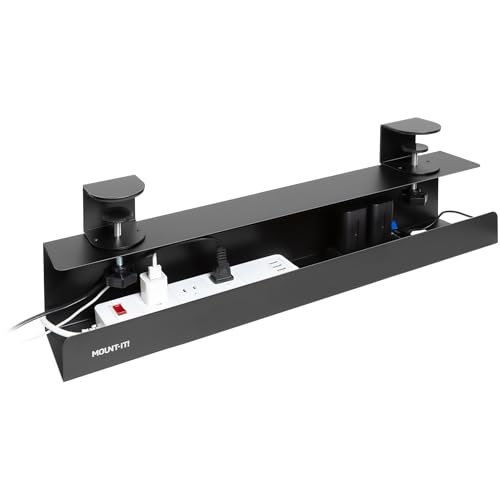
The Mount-It! tray uses a clamp-on, no-drill installation designed for desks where permanent modification is not desired. It is described as suitable for glass desks, standing desks, and various office setups. A notable feature is its dual-facing option, allowing inward installation to hide cords or outward access for easy reach to power strips and adapters, supporting flexible workspace configurations.
Benefits include increased stability over adhesive alternatives and a straightforward setup process. The clamp-on design reduces the risk of loosening over time and provides a durable solution for professional environments that require frequent rearrangements or additions to the cable layout.
Key features include:
– No-drill clamp-on installation
– Suitable for glass and standing desks
– Dual-facing installation for concealment or accessibility
– Long-term stability compared to adhesive trays
Univivi No Drill Under Desk Tray

The Univivi under-desk cable tray offers a large capacity with 36 inches of length. It supports both no-drill clamp-on and screw-fix installation methods, making it adaptable to various tabletop materials including wood, glass, and metal. The tray is described as premium fabric-based, designed to support heavy loads and maintain an organized feel under the desk. It includes built-in ties to secure items inside the tray.
Practical advantages include easy expansion and rearrangement, a robust surface for holding multiple adapters, and compatibility with different desk styles. This versatility makes it suitable for home offices, professional workstations, and gaming setups that require substantial cable management space.
Key features include:
– Large capacity (36″ length)
– Two installation methods: clamp-on or screw-fixed
– Premium fabric construction with flame-retardant properties
– Internal ties for securing items
Buying Guide: Key Considerations For Choosing Cable Management For Fiberglass Tray Systems
- Desk compatibility and installation method
- No-drill vs. clamp-on vs. screw-fixed options—consider whether your environment permits modification and the desk material (wood, metal, glass) when selecting a tray.
- Table thickness tolerance and edge reach: choose models that accommodate your desk dimensions and provide secure edge attachment without damaging the surface.
- Material and durability
- Fabric, PVC, metal, or mesh trays offer different aesthetics, flexibilities, and heat management. For environments with humidity or exposure to elements, fiberglass-friendly or corrosion-resistant materials are preferred.
- Flame retardant properties add safety when cables generate heat from devices in busy spaces.
- Cable capacity and accessibility
- Assess how many power strips, adapters, and cables you need to accommodate. Larger trays support future expansion but may require more space.
- Dual-facing or open-slot designs can influence how easily you access outlets and manage routing.
- Dust and heat management
- Mesh or semi-open designs improve airflow and reduce dust accumulation. Consider trays with ventilation features if space contains heat-generating devices.
- Dust-reducing features help maintain cleaner workstations and reduce maintenance tasks.
- Aesthetics and fit with fiberglass systems
- For fiberglass tray environments, select colors and finishes that blend with your system while providing robust cable management without looking bulky.
- Fabric and dark finishes often pair well with professional setups, while metal trays may convey industrial appeal.
- Installation flexibility and future upgrades
- Consider whether you may need to move or remove the tray easily in the future. No-drill solutions simplify repositioning.
- Look for trays that accommodate additional accessories, such as cable clips, ties, or mounting brackets, to adapt to evolving cable layouts.
When evaluating fiberglass cable tray setups and compatible accessories, prioritize a balance of secure attachment, ease of installation, and room to expand. Each option above provides a distinct approach—from adhesive and clamp-on to no-drill and modular fabric designs—allowing you to tailor a solution to your workspace while maintaining a clean, professional appearance.